From the archive: my network upgrade proposal
Around 2016, I wrote the proposal below for a not-for-profit organisation that had outgrown its network. It was the business case behind the original UniFi AP deployment I describe in The Ubiquiti UAP that won me over.
I’ve removed names, locations and branding, and lightly edited the text for reading online. The findings, options and prices reflect what I proposed at the time. They are historical estimates, not current prices or a record of everything ultimately installed. Some terminology and assumptions also reflect the technology available then.
Summary
This document was prepared to provide an overview of the organisation’s current IT infrastructure. It covers the point of presence1, then expands into network equipment, core devices and network users. It also looks at potential areas of growth and reviews overall network stability.
The document was put together partly as a result of concerns raised in discussions with a few key people: a staff member responsible for facilities planning (who had been closely involved in the organisation’s expansion, including relocating shared spaces and creating storage), a volunteer from the AV/production team, and the long-time IT support contact who had been providing informal, first-hand IT support to the organisation for several years and had taken a proactive approach to keeping client infrastructure in reasonable shape.
Scope
This document covers the main building, an adjoining hall, and a second on-site residence, with the recommended projects designed so an additional nearby building could be connected once the broader network infrastructure (and a next-generation broadband service) was upgraded. Merging the connections between the main site and that additional building would also allow communication services to be consolidated onto a single bill.
Background
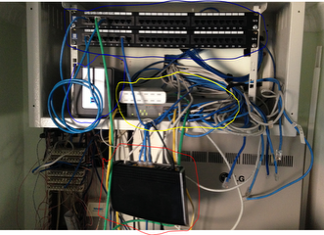
The existing rack is pictured in Figure 1. The equipment shown includes the modem/router (red), a Network Attached Storage device (blue), two switches (yellow) and two 24-port patch panels (navy). As the image shows, the equipment is rather unordered.
There was a router hanging down and out of the rack. It was a safety concern because visitors and volunteers regularly walked past it on their way to offices. The modem was also the single most important part of the network: if it failed, all connectivity would be lost. The installed 24-port patch panels were underused. They’d been installed when an on-site café area was built, with around ten cable runs put in at the time, but the cables themselves (visibly dangling) had never actually been terminated into the panels. Ideally, these cables should terminate at a Central Connection Point (CCP)2, which connects telecommunications network services to the telecommunications outlets (TOs)3 located in individual rooms and offices.
Although not pictured, several rooms around the site had wireless Access Points (APs) providing connectivity to a shared wireless network. These APs varied in model but were all consumer-grade, and not designed to support a network of this size. They also varied in age and were unmanaged, meaning that if reception was poor in a given room, nobody would know until someone reported it. Unmanaged equipment also meant wireless channels overlapped between APs, causing interference and signal loss. AP locations ranged across the offices, the main entry foyer, the sound desk, the library and the children’s hall.
Aside from its physical state, the network was also simply outdated. The installed equipment was at least four years old. One switch was a consumer-grade home gigabit switch supplied more than five years earlier. The switch at the base of the rack ran at only 100Mbps. That was fine for file sharing on a small network, but not suited to packet-intensive transfers like video or audio.
On top of this, the existing Network Attached Storage (NAS) device had been in service for five years or more. It had been built around a single internal hard drive mirrored to a second internal drive. Most disk drives only carry a three-to-five-year warranty, so a NAS this age put both drives at meaningful risk of failure. Keeping it in a dusty, non-climate-controlled space added to that concern.
Figure 1. Core network equipment before the proposed upgrade.
Feedback on the existing network
- The wireless connection in the foyer and children’s area regularly dropped out, disrupting a check-in system used there. The children’s ministry team had resorted to using a 4G mobile connection instead, as it proved more reliable than the existing network.
- Internet access went down at peak times, notably during the main weekly gathering. The ADSL connection couldn’t sustain the load, and connected devices would lose connectivity. A redundant backup connection was clearly needed.
- When a fault did occur, resolution could take hours because of the state of the CCP. No cables or ports were labelled to any standard, not even simple numbering.
- The network was difficult for any IT provider, internal or external, to support: slow connections, several different devices broadcasting wireless, no port labelling, and ageing hardware all made troubleshooting harder than it needed to be.
- There was no process for logging IT incidents so issues could be properly triaged and handed to the right internal or external provider, meaning avoidable extra time (and cost) spent tracking down and resolving problems.
- There was no meaningful access control: the wireless network used a single shared key for every user. Anyone with that key could connect and potentially see traffic on the network. This was a real security concern.
- The amplifiers for the main auditorium sat in a separate, nearly-full rack. It had been suggested that the network and audio equipment be consolidated into a single rack.
Points to consider for an upgrade
- Standardise on a single brand of Access Point for consistent coverage across the site.
- APs should support broadcasting two separate networks, one for staff, one for general visitors, to improve security.
- APs should be centrally managed, to maintain signal quality and minimise interference between units.
- APs should support Power over Ethernet (PoE), so they can be placed anywhere a network cable (and a PoE injector or switch) reaches.
- APs should support seamless (zero hand-off) roaming, so a device moving from one AP’s coverage to another’s doesn’t drop the connection, for example, carrying a tablet from an outdoor entry into the main foyer.
- APs should support RADIUS authentication.
- APs should be covered by local warranty support.
- Upgrade the NAS to a newer system with new drives carrying at least a five-year warranty.
- It should also support RADIUS authentication (for the wireless APs), allowing network access to be controlled via individual usernames and passwords rather than a shared key.
- It should have an external HDD attached for weekly backups, in addition to its internal drives.
- Access should be locked down so each user only sees the files they’re permitted to see.
- Repair the CCP to make patching and fault-finding straightforward.
- New office installs should include at least two data ports each for phone and network access. That would be enough for a desktop computer plus a standard phone line or future VoIP service.
- Replace the core switch(es).
- Should support PoE, to power connected devices such as APs and future VoIP phones.
- Should support VLANs, to separate private and public/guest traffic onto logically distinct networks and improve security.
- Two switches should sit at the centre of the network, so the network can keep running from one switch if the other fails.
Add a backup mobile (4G) internet connection as a redundant link, ensuring critical services stay connected during peak times if the primary ADSL connection struggles. A modest monthly data allowance would likely cover this, and could be reduced once a faster primary connection became available.
Introduce an IT ticketing/help-desk system, so IT, AV and maintenance issues are logged in an orderly way and can be picked up by the right internal or external provider.
Upgrade the network/audio rack to support more equipment, merging two existing cabinets into a single rack unit, with proper power rails replacing ad hoc power boards. Cabling would be neatly terminated into patch panels and then into the switch.
- Create network documentation covering configuration, security and IP addressing for core devices (printers, future VoIP phones, etc.), so there’s a clear reference to work from if something goes wrong.
Recommendations
Option 0: Do nothing
Equipment would simply be replaced reactively as it failed. This would mean an ever-more-mismatched set of hardware, higher support costs, and no configuration backups to restore onto replacement equipment, since nothing was documented or stored centrally.
Option 1
- Audit the network for connected users and devices.
- Configure acquired devices per the specification below.
- Electrical contractor to terminate cable runs into the patch panel: $500
- Rack-mount network cabinet (22RU), shelf, and power-fail-protected power board: $1,000
- 40 × 1m Cat5e patch cables: $140
- Dual-WAN broadband router (next-gen-broadband ready) plus a 4G USB modem and mobile data plan: $542.98
- Managed gigabit switch with SFP, 24-port, ×2 for the rack: $799.90
- Enterprise-grade wireless Access Points ×9: $954.42
- Central AP management controller: $136.32
- 4-bay diskless NAS (quad-core, 2GB RAM) with 2 × 4TB drives: $1,136.98
- Implement a help-desk/ticketing system.
Total: $5,210.60
Option 2
- Audit the network for connected users and devices.
- Configure acquired devices per the specification below.
- Electrical contractor to terminate cable runs into the patch panel: $500
- Rack-mount network cabinet (22RU), shelf, and power-fail-protected power board: $1,000
- 40 × 1m Cat5e patch cables: $140
- Triple-WAN modem/router plus a 4G USB modem and mobile data plan: $203.99
- Managed gigabit switch with SFP, 24-port, ×2 for the rack: $799.90
- Consumer-grade wireless Access Points ×9: $468
- PoE receivers ×9: $225
- 4-bay diskless NAS (quad-core, 2GB RAM) with 2 × 4TB drives: $1,136.98
- Implement a help-desk/ticketing system.
Total: $4,330.87
Considerations
Both options would provide solid coverage across the site and a backup connection if the primary internet service failed. They share the same NAS, switches, cabinet, installation approach, consumables and help-desk system. The NAS in particular was chosen to handle both network authentication and file storage duties.
Option 1 uses equipment from a single manufacturer with a return-to-base warranty, meaning faulty units could be swapped over the counter at a local reseller. Option 2 uses a more mainstream, consumer-grade brand for the access points. The key practical difference is that Option 1’s APs can be centrally managed, including automatic wireless channel management to minimise interference, while Option 2’s cannot.
Looking further ahead, with next-generation broadband being rolled out in the area, Option 1 was the stronger long-term pick. Its manufacturer (a well-known player in wireless networking and VoIP hardware) priced its gear well below the “big name” enterprise vendors, while offering comparable quality. Going with a big-name enterprise vendor instead would likely have meant licensing costs alone exceeding the total budget for either option above.
Neither option included an Uninterruptible Power Supply (UPS), which would also be worth adding. A UPS keeps network equipment, especially the NAS, running through a brief outage, or at least allows it to shut down cleanly, protecting against data loss from a sudden power cut.
Centralising storage on the NAS would also give the organisation a single point for file storage, software distribution and any internal intranet services, along with much simpler management of user permissions and file access.
Timeframe
Either option was expected to take 6–8 weeks to complete. The network would be carefully audited throughout to make sure configuration information stayed accessible in case of future failures, and users would be audited to support proper user-level authentication going forward.
A point of presence (PoP) is an artificial demarcation point or interface point between communicating entities. ↩
The Central Connection Point (CCP) provides a common point for connection of services, i.e. a patch panel. ↩
A Telecommunications Outlet (TO) is a wall outlet containing one or more sockets for connection of devices such as telephones, computers or other Ethernet devices. ↩