The 2025–26 Cyber Threat Report: practical priorities for charities and small businesses
A small organisation does not need to replicate a large security operations centre to take useful action from ASD’s Annual Cyber Threat Report 2025–26. It does need to know who protects its accounts, who maintains its systems and how work continues when something fails.
For charities and not-for-profits, the same questions extend to donor information, client records, volunteer access and the ability to keep delivering services. The report provides business figures and broad sector categories; it does not provide a separate charity or not-for-profit loss estimate. The recommendations below are my application of its findings to smaller organisations.
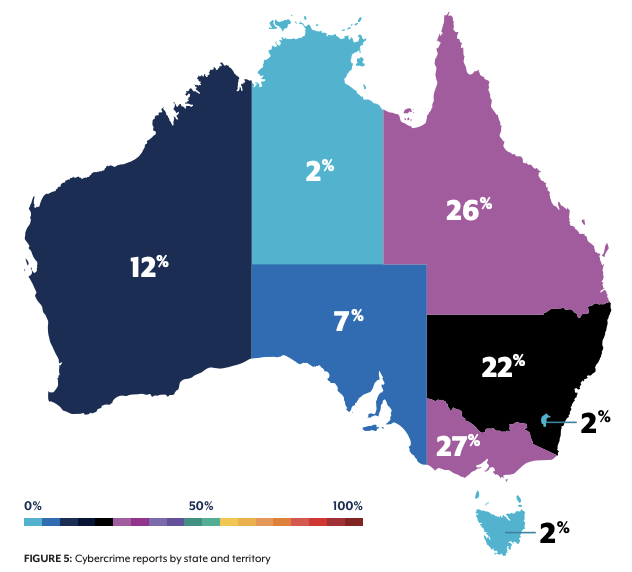
Map: © Commonwealth of Australia 2026, Australian Signals Directorate’s Australian Cyber Security Centre, Annual Cyber Threat Report 2025–26, Figure 5 (printed page 30), reproduced under CC BY 4.0. View the full-size map.
What the business figures actually measure
The report gives the following average self-reported cybercrime costs per report:
| Business size | Average reported cost | Change reported by ASD |
|---|---|---|
| Small | $55,400 | Consistent with last year |
| Medium | $141,300 | Up 45% |
| Large | $148,100 | Down 27% |
Across businesses, the average was $93,500, up 16%. These are Australian-dollar figures from the report’s Year in Review, printed page 3. They are not annual costs for every business, guaranteed losses after an incident, or charity-specific forecasts. They describe the reports received, with the limitations that come with self-reported data.
The state map needs similar care. Queensland accounts for 26% of cybercrime reports, Victoria 27% and New South Wales 22%. These are reporting shares, not state attack probabilities. The chart alone does not establish a per-capita rate or a Townsville-specific rate. It does show that cybercrime reporting is a substantial local concern for Queensland organisations.
Cybercrime reports and the incidents ACSC responds to are different measures. The report records more than 82,000 cybercrime reports and more than 1,500 incident responses; those totals should not be treated as interchangeable.
Protect money and access first
For a small business or community organisation, a useful starting point is email, banking, payroll and the system holding client or donor records. Identify who has administrative access, remove accounts that are no longer needed, and enable strong multifactor authentication or passkeys where supported.
My practical addition is to make payment verification a routine business process. A request to change a supplier’s bank details should trigger a check through an already trusted contact method. An urgent email, a familiar signature or a convincing voice should not be enough to bypass that check. This gives the accounts team a repeatable action when social engineering targets trust and urgency.
For volunteers and committee members, use named accounts and a clear handover process. Write down who removes access when a role ends. Shared passwords make that handover harder and obscure who performed an action.
Remove the systems nobody needs anymore
ASD’s report and medium-business guidance both support reducing unnecessary internet exposure. A charity may have an old campaign website, a former supplier’s remote-access connection or an unsupported device still reachable from outside.
Have the service provider list what is exposed and why. Retire unnecessary services, replace unsupported ones and agree patching responsibilities for those that remain. The companion service review guide gives a practical way to do this without assuming everything can simply be switched off.
For organisations relying mainly on cloud applications, the review still matters. Check administrator accounts, public sharing, integrations and supplier responsibilities. Moving hosting to a provider changes the work; it does not remove the need to manage access and information.
Make a recovery plan that fits the organisation
ASD recommends tested, protected backups and exercised incident and continuity plans. For a small team, start with one important process: taking bookings, paying staff, contacting clients or recording donations.
Ask the provider to demonstrate recovery of a useful sample, record how long it takes and confirm who can authorise it. Identify how the organisation would contact staff and clients if its usual email account were unavailable. Keep the response contacts accessible through an approved method that does not depend on the system that has failed.
This is also where responsibility needs to be explicit. “Our IT company handles it” is incomplete unless the arrangement says what it monitors, when someone responds and how the organisation reaches that person.
A manageable first month
My suggested sequence is to identify essential accounts and services in the first week, review unnecessary access and internet exposure next, then test recovery and run a short incident exercise. Allocate an owner and a due date to every unresolved issue.
Measure progress through evidence: access removed, exposed services retired, updates applied, a restore completed and an incident contact successfully reached. Those are useful improvements even when the organisation has a small budget and no dedicated security employee.
Sources
- ASD Annual Cyber Threat Report 2025–26, printed pages 3, 30 and 47–48; the report page also provides a factsheet for businesses and organisations.
- ASD guidance for small businesses.
- ASD guidance for medium-sized businesses.